









Translation Pad for Windows
- Trial version
- 4.6
- 1
- V3.0.1
Download for Windows
View an ad to download for free

- Ashkon Software LLC
- More programs (15)
A simple, fast desktop translator. Over 100 language pair are supported
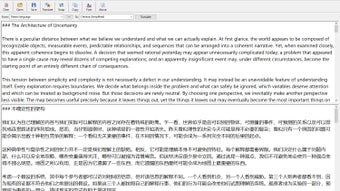
Translation Pad is a simple, fast desktop translator. Type or paste text into the top pane, choose the target language and click Translate - the translation appears in the bottom pane a moment later. There is no web page to open, no browser tab to manage and no text box size limit to fight with: Translation Pad keeps the original and the translated text side by side in one clean window.
The program translates between 144 languages, from Afrikaans to Zulu, including Chinese (Simplified and Traditional), Japanese, Korean, Arabic, Hebrew, Hindi, Russian and all major European languages. If you do not know the language of the text, leave the source set to Detect language and Translation Pad will recognize it for you; the status bar shows which language was detected.
Translation Pad handles long documents, not just short phrases. Up to 50,000 characters can be translated at a time. Long texts are split automatically at line, sentence or word boundaries and translated in several requests, with the progress shown in the status bar. Line breaks and paragraphs are preserved, so the translation keeps the layout of the original. Translation runs in the background, the window stays responsive, and a long translation can be cancelled at any time with the Esc key.
Working with files is easy. Open text files of up to 10 MB; UTF-8, UTF-16 (little and big endian) and ANSI encodings are detected automatically. Save the translation as a UTF-8 text file that opens correctly in Notepad, Word and any other editor, or copy it to the clipboard with one click. Full Unicode support means text in any language and script is displayed and saved correctly.
The Swap button exchanges the source and target languages together with the text of the two panes, so you can translate the result back into the original language to check its meaning. After an automatic detection, Swap makes the detected language the new target.
The interface is designed for everyday use: a toolbar with large buttons, menus and keyboard shortcuts for every command (Ctrl+T, Ctrl+Enter or F5 to translate, Ctrl+O to open, Ctrl+S to save, Ctrl+Shift+S to swap, Ctrl+Shift+C to copy). Drag the splitter to resize the panes, choose the font and font size, and turn on Stay on Top to keep the translator above other windows while you write email, read documents or chat. Languages, font, window position and pane sizes are remembered between sessions.
Translation Pad requires an Internet connection to translate, because translations are made by an online translation service. Opening, editing and saving text works offline.
Loading…
App specs
Developer
- Ashkon Software LLC
- More programs (15)
License
Trial version
Version
3.0.1
Latest update
Platform
Windows
OS
Windows 10
Language
English
Downloads
1
Size
3.02 MB
Translation Pad for PC
- Trial version
- 4.6
- 1
- V3.0.1
Download for PC
View an ad to download for free
User reviews about Translation Pad
Have you tried Translation Pad? Be the first to leave your opinion!
Add reviewTop downloads Document Management for Windows
Top downloads Document Management for Windows
Top downloads Document Management for Windows
Related topics about Translation Pad
Latest articles

Epic Games shifts to automation-first development: Tim Sweeney sees a “golden age of gaming”

SN 1181 gets its sharpest view yet: new images reveal a zombie star

The Dark Crystal: Age of Resistance was canceled by Netflix after one season

Ocarina of Time remake previewed: it fixes Zelda’s classic owl annoyance

PS6 could be very expensive: memory and storage alone may top $680
Laws concerning the use of this software vary from country to country. We do not encourage or condone the use of this program if it is in violation of these laws. Softonic may receive a referral fee if you click or buy any of the products featured here.